
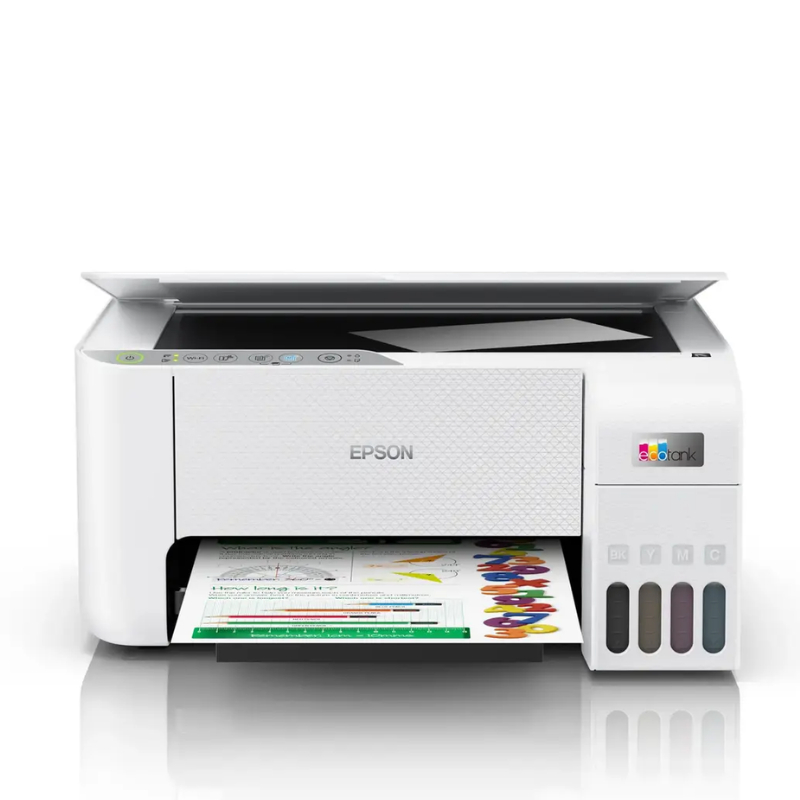
Epson EcoTank L3256 A4 Wi-Fi All-in-One Ink Tank Printer
| Specification | Details |
|---|---|
| Brand | Epson |
| Product | EcoTank L3256 |
| Printer Type | A4 All-in-One Ink Tank Printer |
| Functions | Print, Scan, Copy |
| Printing Technology | Inkjet |
| Connectivity | Wi-Fi |
| Wi-Fi Direct | Supported |
| Ink System | Refillable ink tank |
KSh 25,999.00
Epson EcoTank L3256 A4 Wi-Fi All-in-One Ink Tank Printer
Upgrade your home or office printing with the Epson EcoTank L3256 A4 Wi-Fi All-in-One Ink Tank Printer, a versatile solution for printing, scanning, and copying. Its refillable ink tank system helps you manage printing costs, while wireless connectivity lets you print from compatible devices without relying on a direct USB connection. The compact design fits comfortably into workspaces, and the new condition with a 1-year warranty provides added confidence for everyday use.
Epson EcoTank L3256 Key Features & Benefits
- Print, scan, and copy: Handle everyday documents, assignments, forms, and business paperwork from one compact machine.
- Refillable ink tank system: Reduce cartridge replacement interruptions and enjoy a convenient way to manage ink.
- Wi-Fi connectivity: Print from compatible computers and mobile devices over a wireless network.
- A4 printing: Produce everyday documents, reports, schoolwork, and office paperwork.
- Compact design: Save valuable desk space in your home or office.
- New condition: Receive a new printer suitable for regular home, school, and small-office use.
- 1-year warranty: Enjoy additional confidence with the supplied warranty.
Technical Specifications
| Specification | Details |
|---|---|
| Brand | Epson |
| Product | EcoTank L3256 |
| Printer Type | A4 All-in-One Ink Tank Printer |
| Functions | Print, Scan, Copy |
| Printing Technology | Inkjet |
| Connectivity | Wi-Fi |
| Wi-Fi Direct | Supported |
| Ink System | Refillable ink tank |
| Scanner Type | Contact Image Sensor (CIS) |
| Print Resolution | Up to 5760 × 1440 dpi |
| Colour | Confirm with Potent.it |
| Condition | New |
| Warranty | 1 Year |
| Product Category | Home / Office Printer |
Epson EcoTank L3256 Pros & Benefits
- Lower running costs: Epson’s refillable ink tank system helps you manage ongoing printing expenses.
- Convenient wireless printing: Print from compatible devices without needing to connect directly to the printer.
- Multifunction productivity: Print, scan, and copy using one device.
- Everyday versatility: Handle school assignments, office documents, invoices, and personal paperwork.
- Space-saving workspace: Keep essential printing functions within easy reach.
Epson EcoTank L3256 Variation & Price
| Model | Functions | Connectivity | Condition | Warranty | Price |
|---|---|---|---|---|---|
| Epson EcoTank L3256 | Print, Scan, Copy | Wi-Fi | New | 1 Year | Contact Potent.it for Current Price |
Prices and stock availability may change. Confirm the current price and configuration before ordering.
Epson EcoTank L3256 Suitable Application Areas
- Home printing
- Schools and students
- Small offices
- Home offices
- Business administration
- Accounting and invoicing
- Document scanning and copying
- Personal document management
Shop Epson Printers in Kenya
Explore more Epson printer deals at Potent.it Kenya and find a printer that matches your printing volume, connectivity, and budget.
Shop for More Epson Printers Deals at Potent.it Kenya
Order the Epson EcoTank L3256 today and enjoy convenient printing, scanning, copying, and wireless connectivity for your home or office.
Epson EcoTank L3256 Full Setup Guide
The following setup follows Epson’s official support resources. The L3256 uses Epson’s L3250-series setup materials, including the startup guide, user guide, drivers, and wireless setup instructions.
- Unpack the printer: Remove the printer and accessories from the box. Place it on a stable, level surface near a power outlet.
- Remove protective packaging: Take off protective tape and packaging materials according to the supplied startup guide.
- Fill the ink tanks: Open the ink tank covers and fill each tank with its matching ink colour. Use the correct Epson ink bottles and avoid mixing colours.
- Power on: Connect the power cable, switch on the printer, and follow the initial setup instructions.
- Complete initial ink charging: Allow the printer to complete its initial ink charging process before printing.
- Load paper: Place suitable A4 paper in the rear paper feeder and adjust the paper guides.
- Install the software: Download the appropriate Epson printer and scanner drivers for your operating system.
- Connect to Wi-Fi: Use Epson’s setup instructions to connect the printer to your wireless network.
- Install Epson Smart Panel: Use the compatible mobile app to help set up, monitor, and print from supported smartphones.
- Print a test page: Confirm that the printer produces a clear test page and that the scanner and copier work correctly.
Important: Use the instructions supplied with your specific printer and ink bottles. The startup guide and user guide provide the official installation and operating procedures.
Official Epson setup resources:
- Epson L3256 Official Setup Guide
- Epson L3256 Support, Drivers & Manuals
- Epson EcoTank L3256 Product Page
FAQs
What is the Epson EcoTank L3256?
The Epson EcoTank L3256 is an A4 multifunction ink tank printer that supports printing, scanning, and copying, with Wi-Fi connectivity for compatible devices.
Is the Epson L3256 suitable for home and office use?
Yes. Epson positions the L3256 for families and students, and its multifunction design also suits everyday home-office and small-office tasks.
Does the Epson L3256 support Wi-Fi?
Yes. It supports wireless printing and Wi-Fi Direct.
What functions does the Epson L3256 perform?
It prints, scans, and copies documents.
What is the warranty for this printer?
The supplied product specification states a 1-year warranty.
Is this Epson printer new?
Yes. The supplied product specification states that the printer is new.
What Is in the Box?
- Epson EcoTank L3256 printer
- Ink bottles
- Power cable
- Setup documentation
- Other standard accessories supplied by Epson
Confirm the exact box contents with Potent.it before purchase.
Epson EcoTank L3256 Verdict
The Epson EcoTank L3256 brings together everyday printing, scanning, copying, and wireless convenience in one compact ink tank printer. Its refillable ink system supports practical long-term printing, while the A4 format and multifunction design make it useful for schoolwork, home documents, and small-office tasks. For customers seeking an Epson printer in Kenya, the L3256 offers a balanced combination of convenience and everyday functionality.
Based on 0 reviews
Be the first to review “Epson EcoTank L3256 A4 Wi-Fi All-in-One Ink Tank Printer”
Related products
-
Printers, Epson Printers
Epson EcoTank L4260 A4 Wi-Fi Duplex All-in-One Ink Tank Printer
Technical Specification
- Brand / Manufacturer Epson
- Model Nomenclature EcoTank L4260 (C11CJ63411)
- Core Device Functions A4 Print, Scan, Copy
- Printing Technology On-demand inkjet (piezoelectric)
- Maximum Output Resolution Up to $5760 \times 1440\text{ dpi}$
- ISO 24734 Simplex Print Speed Up to 10.5 ipm (Black) / 5.0 ipm (Color)
- ISO 24734 Auto-Duplex Speed Up to 6.0 ipm (Black) / 4.0 ipm (Color)
- Draft Speed Profiles (A4) Up to 33.0 ppm (Black) / 15.0 ppm (Color)
- Automatic 2-Sided Printing Yes (Auto-Duplex up to standard A4 size)
- Warranty1 Year Comprehensive Retail Warranty
SKU: n/a -
Printers, Epson Printers
Epson EcoTank L14150 A3+ Multifunction Wi-Fi Duplex All-in-One Ink Tank Printer
 Printers, Epson Printers
Epson EcoTank L14150 A3+ Multifunction Wi-Fi Duplex All-in-One Ink Tank Printer
Technical Specification
- Brand / Manufacturer Epson
- Model Part Number EcoTank L14150
- Primary Device Utility A3+ Print (Simplex), A4 Auto-Duplex Print, Scan, Copy, Fax
- Core Printhead Engineering PrecisionCore Printhead Nozzle Configuration
- Maximum Native Resolution Up to $4800 \times 1200\text{ dpi}$ precision array
- ISO 24734 Standard Print Speed Up to 17.0 ipm (Black) / 9.0 ipm (Color)
- Draft Print Speed Profile (A4) Up to 38.0 ppm (Black) / 24.0 ppm (Color)
- Automatic 2-Sided Printing Yes (Auto-Duplex up to standard A4 / Letter format)
- Maximum Flatbed Copy / Scan Size Legal / Folio (Up to $21.6 \times 35.6\text{ cm}$)
- Optical Scanner Element CIS Flatbed Color Image Scanner ($1200 \times 2400\text{ dpi}$)
- Automatic Document Feeder 35-Sheet Integrated ADF (Saves manual handling friction)
- Standard Input Loading Trays 250-Sheet Front Cassette (A4) + 20-Sheet Rear Bypass (A3+)
- Local & Network Data Interfaces Hi-Speed USB 2.0, Ethernet (LAN), Wi-Fi 802.11b/g/n, Wi-Fi Direct
- Out-of-the-Box Inks Supplied Epson 001 Pigment Black (7,500 pages) & Dye Color (6,000 pages)
- Commercial Protection Plan 1 Year Valid Manufacturer Warranty
SKU: n/a -
Printers, Epson Printers
Epson EcoTank L3550 A4 Multifunction Wi-Fi Ink Tank Printer
Technical Specification
- Brand / Manufacturer Epson
- Model Part Number EcoTank Home+ L3550 (C11CK59405)
- Primary Machine Functions A4 Print, A4 Copy, A4 Color Flatbed Scan
- Print Head Technology Upgraded PrecisionCore Printhead Matrix
- Nozzle Configuration Array 400 Nozzles Black / 128 Nozzles per Color (C, M, Y)
- 1 Year Valid Manufacturer Warranty
SKU: n/a -
Printer Consumables, Printers
HP 15A Black Original LaserJet Toner Cartridge (C7115A)
Technical Specifications
OEM Part Number Code C7115A (HP 15A Series)
Consumable Color Deep Monochromatic Black
Print Technology Precision Laser Electrophotographic System
Page Yield Capacity Approximately 2,500 standard pages (Calculated at strict 5% ISO/IEC 19752 coverage standards)
Chemical Formulation Proprietary UltraPrecise micro-fine dual-polymer resin black tonerSKU: n/a


There are no reviews yet.