
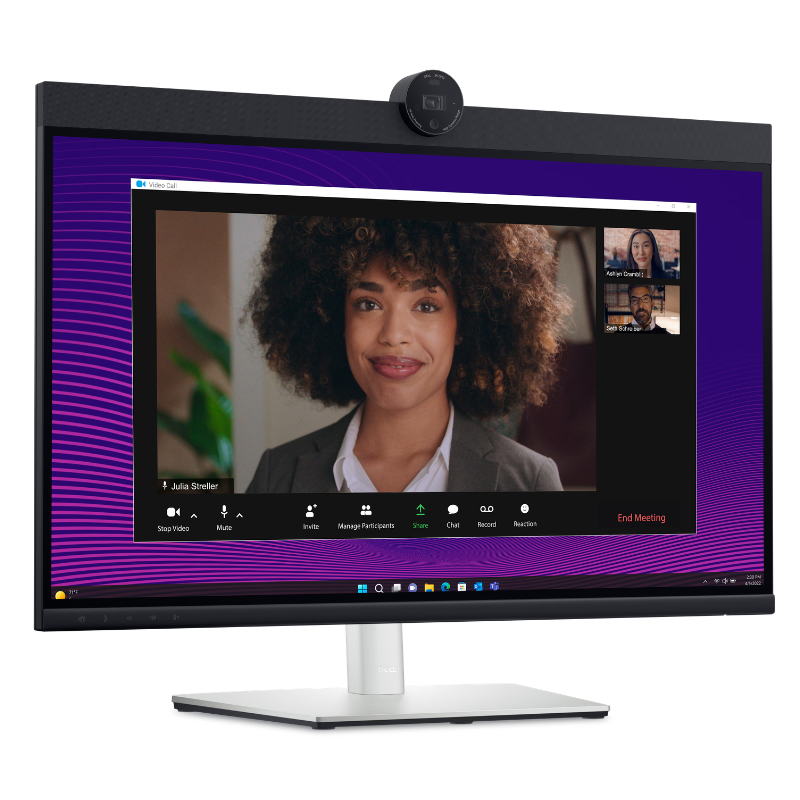
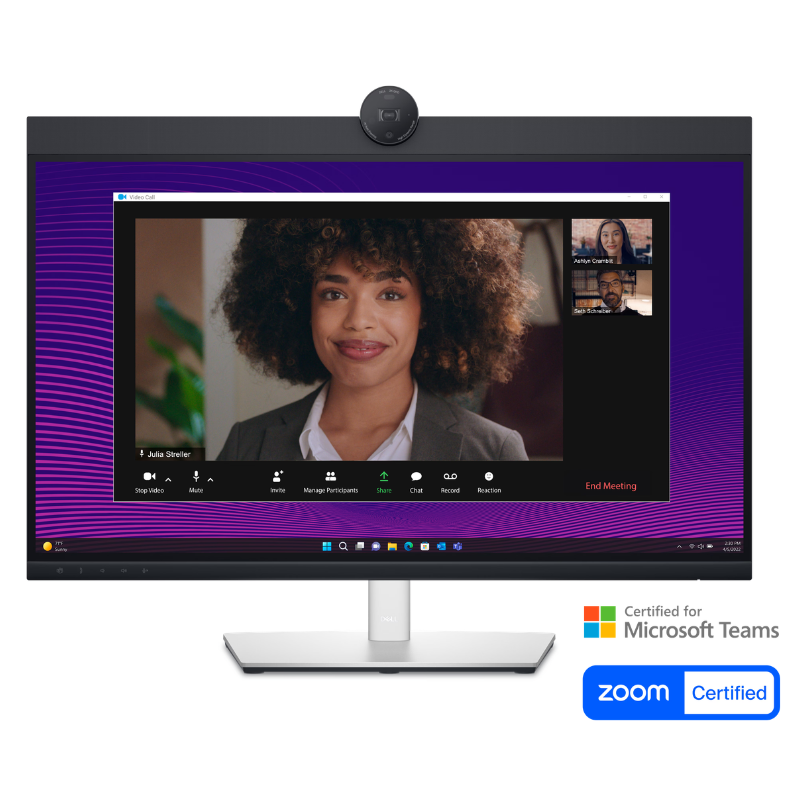
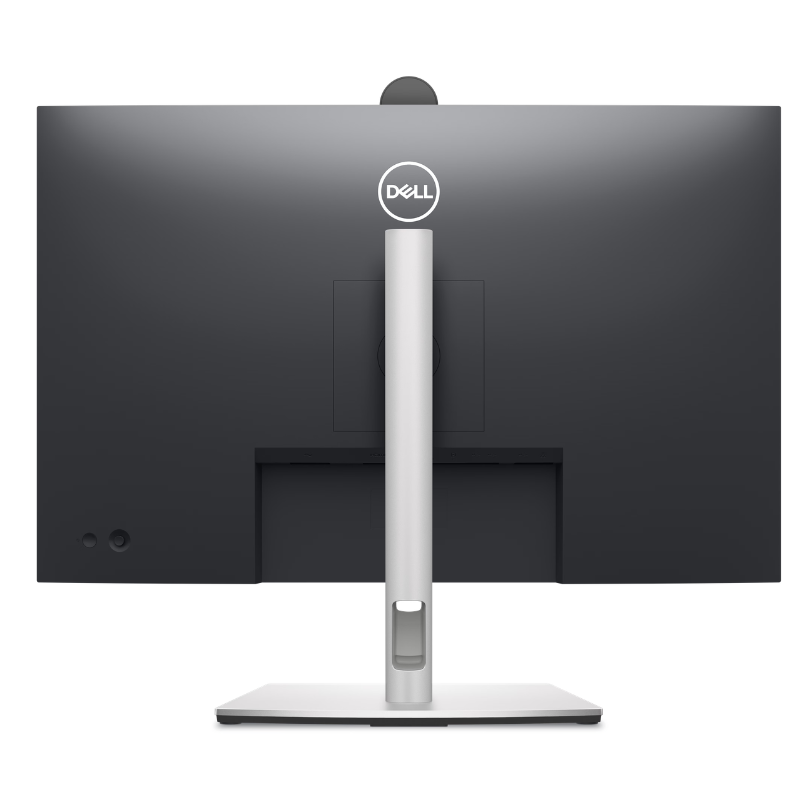
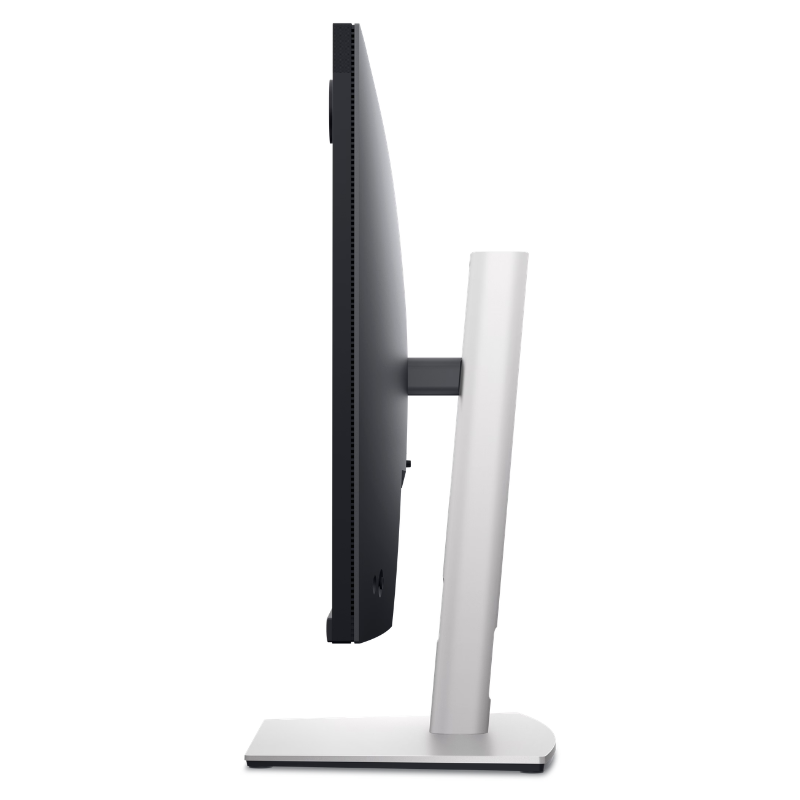
Dell Pro 27 Plus QHD USB-C Video Conferencing Monitor – P2724DEB
| Specification Field | Technical Detail |
| Product Model Name | Dell Pro 27 Plus QHD USB-C Video Conferencing Monitor – P2724DEB |
| Model Code / Part Number | P2724DEB |
| Screen Size & Aspect Ratio | 27.0 Inches (68.47 cm diagonal) / 16:9 widescreen |
| Native Resolution | QHD (2560 x 1440 pixels) at 60 Hz |
| Panel Technology | In-Plane Switching (IPS), Anti-glare with 3H hardness |
| Color Gamut & Depth | 99% sRGB color space, 16.7 Million colors |
| Brightness & Contrast | 350 cd/m² / 1000:1 static contrast ratio |
| Webcam Hardware | Pop-up 4MP RGB + IR sensor, 2K at 30 fps / FHD at 60 fps with privacy shutter |
| Biometric Security | Windows Hello infrared facial recognition |
| Audio Setup | 2x Built-in 5W stereo speakers + 2x digital beamforming microphones |
| Ergonomic Range | 4-Way Stand: Height-adjust (150 mm), Tilt (-5°/+21°), Swivel (-45°/+45°), Pivot (-90°/+90°) |
| Chassis Color | Black and Silver finish |
| VESA Mounting Interface | Standard 100 x 100 mm mounting pattern |
| Daisy Chain Support | Multi-Stream Transport (MST) via DisplayPort Out |
| Warranty | 3-Year Advanced Exchange Service & Premium Panel Guarantee |
KSh 75,999.00 KSh 80,999.00
Dell Pro 27 Plus QHD USB-C Video Conferencing Monitor – P2724DEB
Product Overview & Features Description
Upgrade your remote meeting experience and daily workflow with the Dell Pro 27 Plus QHD USB-C Video Conferencing Monitor – P2724DEB. Built on a crisp 27-inch IPS panel boasting Quad HD (2560 x 1440) resolution, this purpose-built collaboration display gives you 1.77 times more detail than traditional Full HD displays. The Dell Pro 27 Plus QHD USB-C Video Conferencing Monitor – P2724DEB eliminates desktop clutter by integrating an AI-enhanced 4MP RGB + IR 2K webcam running at 30 fps (or FHD at 60 fps) alongside dual noise-canceling digital microphones and dual 5W built-in front-facing stereo speakers.
Seamless collaboration meets effortless single-cable convenience: the Dell Pro 27 Plus QHD USB-C Video Conferencing Monitor – P2724DEB features a high-bandwidth USB-C upstream port that delivers crisp DisplayPort 1.4 video, ultra-fast data pass-through, and up to 90W Power Delivery to charge your laptop simultaneously. The pop-up webcam supports Windows Hello facial authentication for swift, password-free biometrics and retracts safely into the chassis to protect your personal privacy.
Finished in a refined Black and Silver chassis, the Dell Pro 27 Plus QHD USB-C Video Conferencing Monitor – P2724DEB features a versatile 4-way ergonomic stand with height, tilt, swivel, and portrait pivot adjustments. You can buy the authentic Dell Pro 27 Plus QHD USB-C Video Conferencing Monitor – P2724DEB directly from Potent.it Store with complete confidence. Certified for leading unified communication platforms including Microsoft Teams and Zoom, the Dell Pro 27 Plus QHD USB-C Video Conferencing Monitor – P2724DEB brings board-ready audio and video to every call. Enhance your team communication and productivity today by choosing the Dell Pro 27 Plus QHD USB-C Video Conferencing Monitor – P2724DEB.
Technical Specifications
| Specification Field | Technical Detail |
| Product Model Name | Dell Pro 27 Plus QHD USB-C Video Conferencing Monitor – P2724DEB |
| Model Code / Part Number | P2724DEB |
| Screen Size & Aspect Ratio | 27.0 Inches (68.47 cm diagonal) / 16:9 widescreen |
| Native Resolution | QHD (2560 x 1440 pixels) at 60 Hz |
| Panel Technology | In-Plane Switching (IPS), Anti-glare with 3H hardness |
| Color Gamut & Depth | 99% sRGB color space, 16.7 Million colors |
| Brightness & Contrast | 350 cd/m² / 1000:1 static contrast ratio |
| Webcam Hardware | Pop-up 4MP RGB + IR sensor, 2K at 30 fps / FHD at 60 fps with privacy shutter |
| Biometric Security | Windows Hello infrared facial recognition |
| Audio Setup | 2x Built-in 5W stereo speakers + 2x digital beamforming microphones |
| Ergonomic Range | 4-Way Stand: Height-adjust (150 mm), Tilt (-5°/+21°), Swivel (-45°/+45°), Pivot (-90°/+90°) |
| Chassis Color | Black and Silver finish |
| VESA Mounting Interface | Standard 100 x 100 mm mounting pattern |
| Daisy Chain Support | Multi-Stream Transport (MST) via DisplayPort Out |
| Warranty | 3-Year Advanced Exchange Service & Premium Panel Guarantee |
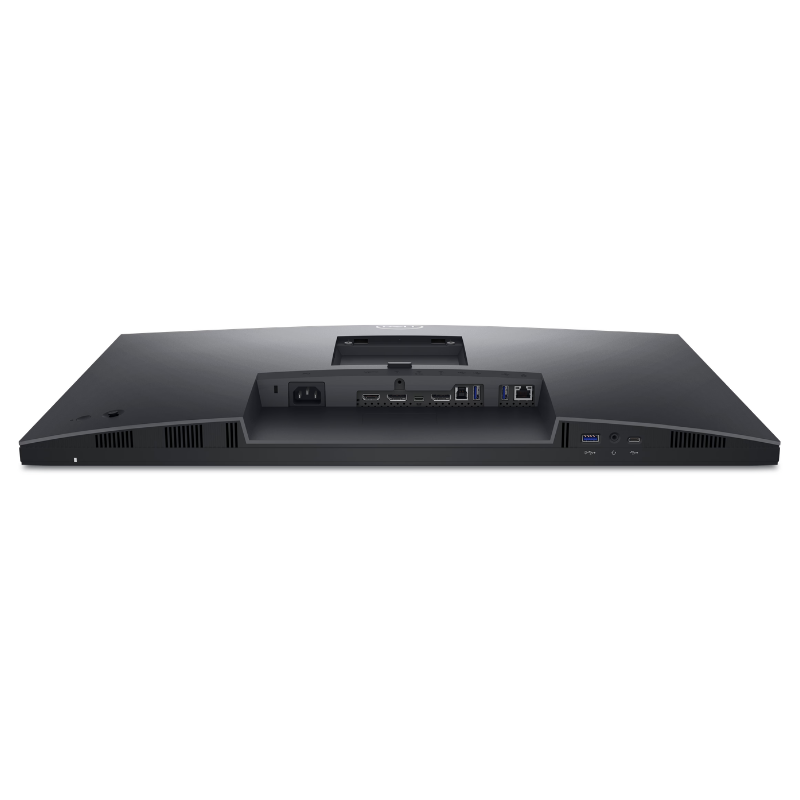
Complete Connectivity Breakdown
-
1x HDMI 1.4: High-definition video and audio input for second PCs or media sources.
-
1x DisplayPort 1.4 (In): Direct high-bandwidth digital input from discrete workstation graphics.
-
1x DisplayPort 1.4 (Out) with MST: Enables daisy-chaining a second monitor using a single video cable from the PC.
-
1x RJ45 Ethernet Port (1GbE): Provides a rock-solid, stable wired network pass-through to connected laptops.
-
1x USB 3.2 Gen 1 Type-C Upstream: Supports DisplayPort 1.4 Alt Mode, high-speed data, and up to 90W Power Delivery.
-
1x USB 3.2 Gen 1 Type-B Upstream: Connects USB peripherals and conferencing hardware to a secondary desktop computer.
-
1x USB 3.2 Gen 1 Type-C Downstream: Front-accessible data and charging port delivering up to 15W Power Delivery.
-
2x USB 3.2 Gen 1 Type-A Downstream: Standard ports for wireless keyboard/mouse dongles, storage drives, and flash keys.
-
1x USB 3.2 Gen 1 Type-A Downstream with BC1.2: Fast-charge port supplying up to 2A max for mobile phones and accessories.
-
1x 3.5mm Combo Audio Jack: Connects wired headsets or microphones directly to the display.
Pros & Key Benefits
-
All-in-One Video Conferencing Hub: Eliminates separate webcams, messy external speaker wires, and desk microphones by housing high-fidelity 2K video and 5W speakers directly on the panel.
-
Hardware Pop-Up Privacy: The 4MP webcam physically retracts into the monitor casing when pushed down, physically blocking unauthorized camera access.
-
90W USB-C Single-Cable Dock: Power your laptop, stream QHD video, route gigabit internet, and link all desk accessories through one reversible USB-C cable.
-
DisplayPort MST Daisy-Chaining: Create a dual-QHD workstation array cleanly by connecting a second screen directly to the monitor’s DisplayPort-Out jack.
-
Windows Hello Instant Logins: The integrated IR camera lets you log into Windows instantly and securely with facial recognition.
Variation Price Matrix (Kenya Shillings – KSh)
| Dell Monitor Model | Panel Size & Specs | Collaboration Features | Hub / Power Delivery | Estimated Price (KSh) |
| Dell P2724DEB (Featured) | 27.0″ QHD (2560×1440) | Pop-up 2K Cam + Dual 5W Speakers | 90W USB-C + 1GbE RJ45 | KSh 84,500 |
| Dell P2424HEB | 23.8″ FHD (1920×1080) | Pop-up 2K Cam + Dual 5W Speakers | 90W USB-C + 1GbE RJ45 | KSh 64,000 |
| Dell P2725DE | 27.0″ QHD (2560×1440) | Standard (No Integrated Camera) | 90W USB-C + 1GbE RJ45 | KSh 68,500 |
| Dell UltraSharp U2724DE | 27.0″ QHD IPS Black | Standard (Thunderbolt 4 Hub) | 90W TB4 + 2.5GbE RJ45 | KSh 92,000 |
Looking for additional sizes and non-conferencing displays? Shop for more Dell monitors deals at Potent.it.
Suitable Application Areas
-
Executive Desks & Hybrid Remote Work: Keeps the desk neat and minimal while delivering clear, professional video and voice for daily Zoom and Microsoft Teams calls.
-
Telemedicine & Client Consultations: Medical practitioners and legal consultants can conduct clear, encrypted virtual appointments with natural eye-level camera placement.
-
Financial & Data Analysis: The 27-inch 2560 x 1440 resolution provides ample space for dense spreadsheets and multi-window monitoring without pixelation.
-
Shared Hot-Desking Spaces: Visiting hybrid workers can connect a Mac or Windows laptop via USB-C to immediately access Gigabit LAN, external display real estate, and conferencing tools.
Frequently Asked Questions (FAQs)
Q: What is in the box when I purchase?
-
1x Dell Pro 27 Plus QHD Video Conferencing Monitor (P2724DEB panel)
-
1x Stand Riser and Heavy-Duty Base
-
1x Power Cable
-
1x DisplayPort 1.4 to DisplayPort Cable (1.8 m)
-
1x USB 3.2 Gen 1 Type-C to Type-C Cable (1.0 m, 90W rated)
-
1x USB 3.2 Gen 1 Type-A to Type-B Upstream Cable (1.8 m)
-
Quick Setup Guide, Cable Management Clip, and Regulatory/Safety Inserts
Q: Does the webcam require a separate cable if using HDMI or DisplayPort?
If connecting your PC via HDMI or DisplayPort for video, you must also connect the included USB Type-A to Type-B (or USB-C) upstream cable so the computer recognizes the webcam, microphones, speakers, and USB ports. If using the primary USB-C cable, everything passes through that single line.
Q: Can I adjust the angle of the webcam?
Yes, the pop-up webcam housing features a manual tilt adjustment wheel, allowing you to angle the camera up or down to frame your face regardless of your seating height.
Q: Where can I find official setup guides and firmware?
Access user manuals, safety instructions, and Dell Peripheral Manager at the Dell Pro 27 Plus QHD USB-C Video Conferencing Monitor – P2724DEB Installation Guide & Support Manuals.
Q: How do I purchase this monitor in Kenya?
Available directly at the Potent.it Store in Nairobi for walk-in collection or through Online Purchase with safe Countrywide delivery across Kenya.
The Dell Pro 27 Plus QHD USB-C Video Conferencing Monitor – P2724DEB provides an all-in-one solution for modern virtual workspaces. Combining an integrated pop-up 2K camera, studio-quality microphones, 5W stereo speakers, and a 90W USB-C docking hub with Gigabit Ethernet, it transforms any workstation into a clutter-free, professional collaboration station.
Based on 0 reviews
Be the first to review “Dell Pro 27 Plus QHD USB-C Video Conferencing Monitor – P2724DEB”
Related products
-
Dell Monitors, Monitors & Displays
Dell P2425H 23.8″ FHD Monitor (P2425H)
Technical Specifications (P2425H)
Feature Specification Panel Size 23.8 inches (IPS Technology) Resolution 1920 x 1080 (FHD) at 100Hz Contrast Ratio 1500:1 (Typical) Brightness 250 cd/m² Ergonomics Height (150mm), Tilt, Swivel, Pivot (±90°) VESA Mount Yes (100mm x 100mm) Connectivity 1x HDMI 1.4, 1x DP 1.2, 1x VGA USB Ports 1x USB-B (Upstream), 3x USB-A (Downstream), 1x USB-C (Data only, 15W PD) SKU: n/a -
Lenovo Monitors, Monitors & Displays
Lenovo D19-10 18.5″ HD Monitor
- Brand : Lenovo
- Screen Size : 18.5 Inch
- Monitor Type : LED
- Model Number :61E0KCT6EU
- Screen Dimensions (H x V): 409.8 x 230.4 mm
- Resolution: 1366 x 768
- Viewing Angle (H x V @ CR 10:1) 90° / 65°
- CONNECTIVITY: Video Input Signals HDMI + VGA
- Weight Packed (kg/lb): 3.38 kg / 7.44 lbs.
- Color:Black
SKU: 61E0KCT6EU -
Dell Monitors, Monitors & Displays
Dell E2725HM 27″ FHD Monitor
Dell E2725HM Technical Specifications (E2725HM)
Feature Specification Panel Size 27 inches Panel Type In-Plane Switching (IPS) Resolution 1920 x 1080 (Full HD) Refresh Rate 100Hz Contrast Ratio 1000:1 (Typical) Connectivity 1x HDMI 1.4, 1x DisplayPort 1.2, 1x VGA Ergonomics Tilt Adjustment (-5° to +21°) VESA Mounting Yes (100mm x 100mm) Included Cable DisplayPort to DisplayPort cable SKU: n/a -
Dell Monitors, Monitors & Displays
Dell SE2425HM 23.8″ FHD Monitor – Smooth & Comfortable Display
Technical Specifications (SE2425HM)
Feature Specification Panel Size 23.8 inches Panel Type In-Plane Switching (IPS) Resolution 1920 x 1080 (Full HD) Refresh Rate 100Hz Response Time 5ms (Fast) / 8ms (Typical) Contrast Ratio 1000:1 (Typical) Connectivity 1x HDMI 1.4, 1x VGA Ergonomics Tilt Adjustment (-5° to +21°) VESA Mounting 100mm x 100mm Eye Tech ComfortView Plus (TÜV 3-star Certified) SKU: n/a


There are no reviews yet.