
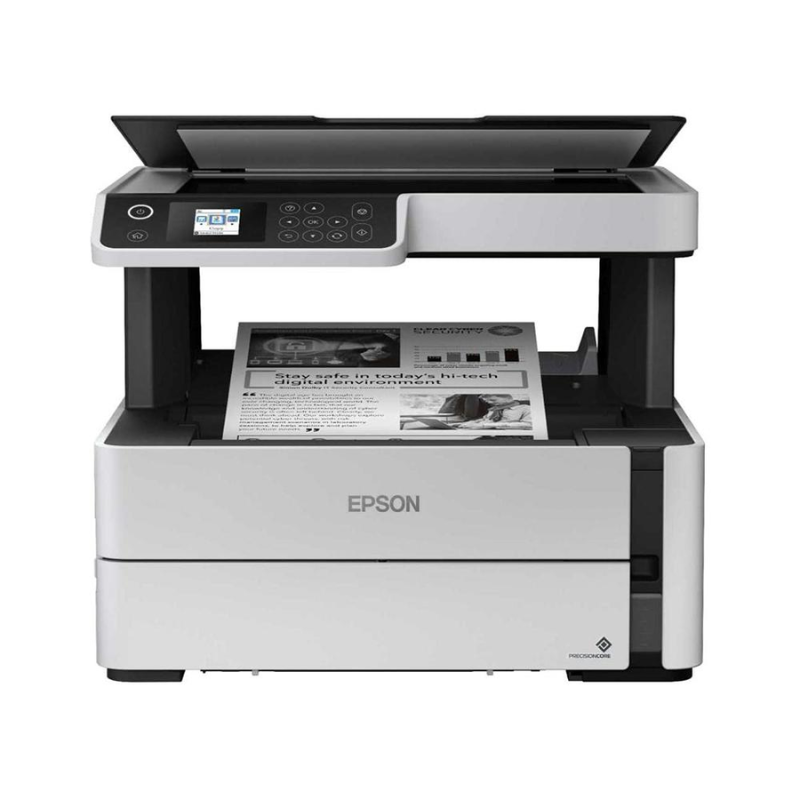
Epson EcoTank Monochrome A4 M2170 All-in-One Wi-Fi Duplex Ink Tank Printer
| Specification | Details |
|---|---|
| Brand | Epson |
| Product Family | EcoTank |
| Model | M2170 |
| Printer Type | Monochrome A4 All-in-One Ink Tank Printer |
| Functions | Print / Scan / Copy |
| Print Technology | PrecisionCore |
| Printing | Monochrome / Black & White |
| Paper Size | A4 and compatible sizes |
| Duplex Printing | Automatic Duplex |
| Connectivity | Wi-Fi, USB |
| Display | LCD |
| Ink System | Cartridge-free EcoTank |
| Condition | New |
| Warranty | 1 Year |
| Recommended Use | Business, Office, Education, Home |
KSh 43,000.00
Epson EcoTank Monochrome A4 M2170 All-in-One Wi-Fi Duplex Ink Tank Printer
The Epson EcoTank Monochrome M2170 delivers efficient black-and-white printing for businesses, offices, schools, and home users that need reliable document production. This A4 all-in-one ink tank printer combines printing, scanning, and copying with wireless connectivity and automatic duplex printing, helping you reduce paper consumption and simplify everyday document workflows.
The Epson EcoTank Monochrome M2170 uses a cartridge-free ink tank design that helps reduce the inconvenience of frequent cartridge replacement. Epson highlights its Precision Core printing technology and high-yield replacement ink bottles, making the printer suitable for users who regularly produce substantial volumes of monochrome documents.
Epson EcoTank Monochrome M2170 Key Features & Benefits
- Monochrome A4 printing – Produce clear black-and-white documents for reports, invoices, forms, assignments, and business correspondence.
- EcoTank ink tank system – Refill the integrated tank instead of relying on conventional cartridges, helping simplify ongoing printing.
- Automatic duplex printing – Print on both sides of compatible paper to help reduce paper consumption and create professional-looking documents.
- All-in-one functionality – Print, scan, and copy from one compact business printer.
- Wi-Fi connectivity – Connect compatible computers and devices to the printer over a wireless network.
- PrecisionCore technology – Epson’s print technology supports consistent document production.
- High-yield printing – Epson states that replacement ink bottles can provide up to 6,000 black pages under its stated testing conditions. Actual yields vary according to usage and other factors.
- New condition – Receive a new printer backed by the supplied 1-year warranty.
Technical Specifications
| Specification | Details |
|---|---|
| Brand | Epson |
| Product Family | EcoTank |
| Model | M2170 |
| Printer Type | Monochrome A4 All-in-One Ink Tank Printer |
| Functions | Print / Scan / Copy |
| Print Technology | PrecisionCore |
| Printing | Monochrome / Black & White |
| Paper Size | A4 and compatible sizes |
| Duplex Printing | Automatic Duplex |
| Connectivity | Wi-Fi, USB |
| Display | LCD |
| Ink System | Cartridge-free EcoTank |
| Condition | New |
| Warranty | 1 Year |
| Recommended Use | Business, Office, Education, Home |
Epson EcoTank Monochrome M2170 Pros & Benefits
✓ Lower-maintenance printing: Replaceable ink bottles simplify replenishment compared with traditional cartridges.
✓ Efficient document production: Monochrome printing suits everyday business and administrative documents.
✓ Paper-saving duplex: Automatically print on both sides of compatible paper.
✓ Wireless convenience: Connect compatible devices over Wi-Fi for flexible office printing.
✓ Multifunction productivity: Print, scan, and copy from one machine.
✓ High-volume suitability: The EcoTank design targets users who print frequently.
✓ Professional value: Combine practical functionality with a new printer and 1-year warranty.
Epson EcoTank Monochrome M2170 Variation & Price
| Model | Type | Functions | Connectivity | Duplex | Condition | Warranty | Price |
|---|---|---|---|---|---|---|---|
| Epson EcoTank M2170 | A4 Monochrome Ink Tank | Print / Scan / Copy | Wi-Fi / USB | Automatic | New | 1 Year | Contact Potent.it for Current Price |
Prices and availability may change. Confirm the current price, stock, and included accessories before ordering.
Suitable Application Areas
The Epson EcoTank Monochrome M2170 works well in:
- Corporate offices
- Small and medium-sized businesses
- Home offices
- Schools and colleges
- Accounting departments
- Administration offices
- Retail businesses
- Reception desks
- Professional service offices
- Government and institutional offices
- Document-intensive work environments
Epson EcoTank Monochrome M2170 Full Setup Guide
Set up the Epson EcoTank Monochrome M2170 carefully before starting regular printing:
1. Unpack the Printer
Remove the printer and supplied accessories from the packaging. Remove protective materials and place the printer on a stable, level surface with sufficient space around it.
2. Power On and Complete Initial Setup
Connect the printer to power and switch it on. Follow the printer’s on-screen instructions for the initial configuration.
3. Fill the Ink Tank
Use the correct Epson ink specified for the M2170. Follow the supplied setup documentation carefully when filling the ink tank and avoid mixing incompatible inks.
4. Load Paper
Load compatible A4 paper into the paper tray and configure the paper size and type through the printer settings where required.
5. Connect to Wi-Fi
From the printer control panel, select Wi-Fi Setup → Wi-Fi (Recommended) → Wi-Fi Setup Wizard, select your wireless network, and enter the Wi-Fi password. Epson documents this procedure for the M2170.
For compatible WPS routers, select Wi-Fi Setup → Wi-Fi (Recommended) → Push Button Setup (WPS) and follow the instructions displayed on the printer.
6. Install Epson Software
Download the appropriate Epson software and drivers for your operating system. Epson’s support page provides the M2170’s User’s Guide, Startup Guide, software, and setup resources.
7. Connect Your Computer
After installing the software, select the M2170 when prompted and complete the connection process. Epson’s setup guidance supports wireless computer-to-printer configuration through its installer.
8. Test Print, Scan and Copy
Print a test document, then test the scanner and copier functions. Check alignment, paper feeding, print quality, and network connectivity before starting routine work.
Official Epson Setup & Referral Resources
For the latest drivers, manuals, troubleshooting information, and setup instructions, use the official Epson M2170 Support Centre:
Epson EcoTank M2170 Official Support & Setup
Epson also provides a dedicated User’s Guide and Startup Guide for the M2170.
Shop Epson Printers in Kenya
Looking for more Epson printers? Explore the Epson printer range at Potent.it Kenya and compare models for home, office, education, and business printing.
Shop More Epson Printer Deals at Potent.it Kenya
Shop the Epson EcoTank Monochrome M2170 at Potent.it Kenya today and upgrade your document workflow with efficient monochrome printing, automatic duplex capability, wireless connectivity, scanning, copying, and EcoTank convenience.
FAQs
What is the Epson EcoTank Monochrome M2170?
The Epson EcoTank Monochrome M2170 is an A4 monochrome all-in-one ink tank printer designed for printing, scanning, and copying documents.
Is the Epson M2170 a colour printer?
No. The M2170 is designed for monochrome black-and-white printing, making it particularly suitable for business documents, reports, invoices, forms, and other text-heavy workloads.
Does the Epson M2170 support Wi-Fi?
Yes. The Epson EcoTank Monochrome M2170 supports Wi-Fi connectivity, allowing compatible computers and devices to connect wirelessly.
Does the M2170 support automatic duplex printing?
Yes. The printer supports automatic duplex printing, allowing compatible documents to print on both sides of the paper.
Can the Epson M2170 scan and copy?
Yes. It is an all-in-one multifunction printer with printing, scanning, and copying capabilities.
Is the Epson M2170 suitable for an office?
Yes. Its monochrome printing, EcoTank system, Wi-Fi connectivity, duplex printing, scanning, and copying make it suitable for many office and document-focused environments.
What condition is this Epson M2170?
This configuration is supplied in new condition.
What warranty does the Epson M2170 have?
The supplied product specification includes a 1-year warranty.
What ink system does the Epson M2170 use?
The printer uses an EcoTank cartridge-free ink tank system. Epson states that its replacement black ink bottle can yield up to 6,000 pages under specified testing conditions.
What Is in the Box?
The package includes the Epson EcoTank Monochrome M2170 printer and standard supplied accessories required for initial setup. Exact contents can vary by market and package configuration, so confirm the included ink, cables, documentation, and accessories with Potent.it before purchase.
Epson EcoTank Monochrome M2170 Verdict
The Epson EcoTank Monochrome M2170 combines the practical advantages of an ink tank system with A4 monochrome printing, automatic duplex printing, Wi-Fi connectivity, scanning, and copying. It gives offices, schools, professionals, and home users a convenient solution for producing regular black-and-white documents while keeping the workflow simple.
For users who prioritise efficient document printing and multifunction productivity, the Epson EcoTank Monochrome M2170 offers a practical business printing solution. Shop from Potent.it Kenya and choose a printer designed to support everyday document demands with less cartridge-related maintenance.
Based on 0 reviews
Be the first to review “Epson EcoTank Monochrome A4 M2170 All-in-One Wi-Fi Duplex Ink Tank Printer”
Related products
-
Printers, Epson Printers
Epson EcoTank L5290 A4 Wi-Fi All-in-One Ink Tank Printer
Specification
- Brand / Manufacturer Epson
- Model Code / SKU Eco Tank L5290 (C11CJ65409)
- Primary Device Core Utilities A4 Print, Scan, Copy, Broadcast & PC-Fax Module
- Printhead Technology Engine On-Demand Inkjet
- Nozzle Matrix Configuration 180 Nozzles Black / 59 Nozzles per Color (Cyan, Magenta, Yellow)
- Maximum Native Resolution 5760 \times 1440\text{ dpi} Ultra-High-Definition Output
- ISO 24734 Print Speed Standards Up to 10.0 ipm (Monochrome) / 5.0 ipm (Color)
- Draft Print Speed Profile (A4) Up to 33.0 ppm (Black & White) / 15.0 ppm (Color Matrix)
- Automatic Document Feeder 30-Sheet Integrated ADF Unit for Multi-Page Operations
- Duplex Copy/Print Handling Manual Duplex Framework Coordination
- Optical Flatbed Scanner Type Color CIS Flatbed Image Scanner Matrix (1200 \times 2400\text{ dpi})
- Fax Storage Capacity Memory 100-Page Integrated Memory (Super G3 Fast Dialing Protocol)
- Main Sheet Media Tray Loading Rear Paper Feed (Up to 100 Sheets Plain A4 Paper / 20 Sheets Photo)
- Multi-Network Link Interfaces Hi-Speed USB 2.0, RJ45 Ethernet (LAN), Wi-Fi 802.11b/g/n, Wi-Fi Direct
- Commercial Warranty 1 Year or 30,000 Prints Local Manufacturer Warranty
SKU: C11CJ65409 -
Printers, Epson Printers
Epson EcoTank L3550 A4 Multifunction Wi-Fi Ink Tank Printer
Technical Specification
- Brand / Manufacturer Epson
- Model Part Number EcoTank Home+ L3550 (C11CK59405)
- Primary Machine Functions A4 Print, A4 Copy, A4 Color Flatbed Scan
- Print Head Technology Upgraded PrecisionCore Printhead Matrix
- Nozzle Configuration Array 400 Nozzles Black / 128 Nozzles per Color (C, M, Y)
- 1 Year Valid Manufacturer Warranty
SKU: n/a -
Printer Consumables, Printers
HP 13A Black Original LaserJet Toner Cartridge (Q2613A)
Technical Specifications
OEM Part Number Code Q2613A (HP 13A Series)
Consumable Color Deep Monochromatic Black
Print Technology Precision Laser Electrophotographic System
Page Yield Capacity Approximately 2,500 standard pages (Calculated at strict 5% ISO/IEC 19752 coverage standards)SKU: n/a -
Printers, Epson Printers
Epson EcoTank L3260 A4 Multifunction Wi-Fi Ink Tank Printer
Specification
- Brand / Manufacturer Epson
- Model Configuration EcoTank L3260 (C11CJ66403)
- Primary Machine Functions A4 Print, A4 Copy, A4 Color Flatbed Scan
- Print Head Technology Micro Piezo Heat-Free Printhead Matrix
- Nozzle Configuration Array 180 Nozzles Black / 59 Nozzles per Color (C, M, Y)
- Manufacturer Warranty 1 Year or 30,000 Prints
SKU: n/a


There are no reviews yet.