
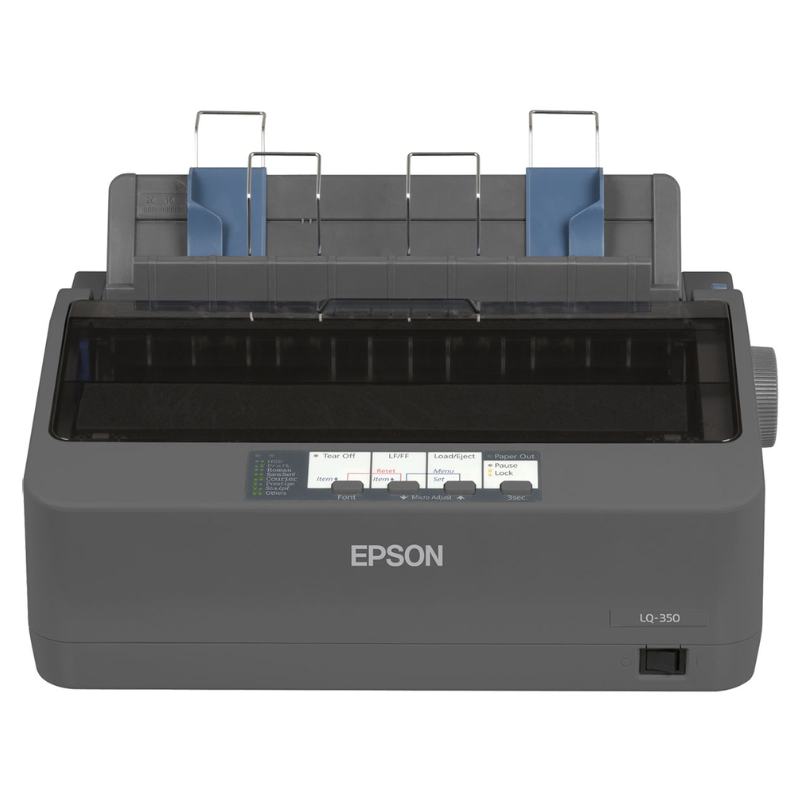
Epson LQ-350 Dot Matrix Printer New with 1-Year Warranty
| Specification | Epson LQ-350 Details |
|---|---|
| Printer Type | Dot Matrix Printer |
| Printing Technology | 24-pin Impact Dot Matrix |
| Columns | 80 columns |
| HighSpeed-Draft | 347 characters/sec at 10 cpi |
| Draft Speed | 260 characters/sec at 10 cpi |
| Letter Quality Speed | 86 characters/sec at 10 cpi |
| Resolution | 360 × 180 dpi |
| Carbon Copies | 3 plus original |
| Interfaces | USB 2.0, RS-232, Bidirectional Parallel |
| Paper Handling | Single sheet, continuous media, labels, roll paper, envelopes |
| Memory | 128KB |
| Ribbon Yield | Up to 3,000,000 characters Draft / 2,500,000 LQ |
KSh 42,999.00
Epson LQ-350 Dot Matrix Printer – New with 1-Year Warranty
The Epson LQ-350 Dot Matrix Printer delivers dependable, economical printing for businesses that handle invoices, receipts, forms, reports, delivery notes, and multi-part documents. Its 24-pin impact dot matrix technology, 80-column format, and support for continuous paper and multi-part stationery make it a practical choice for front-office and back-office environments. Epson specifies up to 347 characters per second in HighSpeed-Draft mode and a ribbon yield of up to 2.5 million characters in LQ mode, helping businesses control recurring printing costs.
Epson LQ-350 Dot Matrix Printer Key Features & Benefits
- 24-pin impact dot matrix printing – Produce clear business documents and multi-part forms.
- High-speed printing – Reach up to 347 characters per second in HighSpeed-Draft mode.
- 80-column format – Handle standard business documents efficiently.
- Multi-part printing – Print an original plus up to three carbon copies, according to Epson specifications.
- Long ribbon yield – Print up to 2.5 million characters in LQ mode, helping reduce ribbon replacement frequency.
- Multiple connectivity options – Connect through USB 2.0, RS-232 serial, or bidirectional parallel interfaces.
- Continuous paper support – Handle continuous forms, labels, envelopes, roll paper, and single-sheet media.
- Compact design – Fit the printer neatly into office environments and service counters.
- Low power consumption – Epson lists approximately 1.3W in standby and 22W powered operation.
- New condition – Supplied as a new product with a 1-year warranty as specified for this Potent.it listing.
Technical Specifications
| Specification | Epson LQ-350 Details |
|---|---|
| Printer Type | Dot Matrix Printer |
| Printing Technology | 24-pin Impact Dot Matrix |
| Columns | 80 columns |
| HighSpeed-Draft | 347 characters/sec at 10 cpi |
| Draft Speed | 260 characters/sec at 10 cpi |
| Letter Quality Speed | 86 characters/sec at 10 cpi |
| Resolution | 360 × 180 dpi |
| Carbon Copies | 3 plus original |
| Interfaces | USB 2.0, RS-232, Bidirectional Parallel |
| Paper Handling | Single sheet, continuous media, labels, roll paper, envelopes |
| Memory | 128KB |
| Ribbon Yield | Up to 3,000,000 characters Draft / 2,500,000 LQ |
| Emulations | ESC/P2, IBM PPDS |
| MTBF | 10,000 operating hours |
| Print Head Life | 400 million strokes/wire |
| Power Consumption | Approx. 22W |
| Dimensions | 348 × 275 × 154 mm |
| Weight | Approx. 4.1 kg |
| Condition | New |
| Warranty | 1 Year |
| Brand | Epson |
| Model | LQ-350 |
Specifications are based on Epson’s published LQ-350 specifications; product specifications may change without prior notice.
Epson LQ-350 Dot Matrix Printer Pros & Benefits
✓ Cost-effective printing: High ribbon yield helps reduce ongoing consumable costs.
✓ Reliable form printing: Impact technology suits continuous and multi-part stationery.
✓ Flexible connectivity: USB, serial, and parallel interfaces support different business systems.
✓ Efficient document production: 80-column printing supports common business paperwork.
✓ Compact footprint: Fits easily into offices, counters, and workstations.
✓ Business-focused design: Ideal for environments that still rely on continuous forms and duplicate documentation.
Epson LQ-350 Dot Matrix Printer Variation & Price
| Model | Technology | Columns | Connectivity | Condition | Warranty | Price |
|---|---|---|---|---|---|---|
| Epson LQ-350 | 24-pin Dot Matrix | 80 | USB / Serial / Parallel | New | 1 Year | Contact Potent.it for Current Price |
Price and stock availability may change. Confirm the current price and availability before ordering.
Suitable Application Areas
The Epson LQ-350 Dot Matrix Printer works particularly well for:
- Accounting departments
- Retail businesses
- Warehouses and logistics
- Invoicing and billing
- Delivery documentation
- Government and administrative offices
- Schools and institutions
- Banks and financial offices
- Manufacturing businesses
- Transport companies
- Service counters
- Businesses using continuous or multi-part forms
Shop Epson Printers in Kenya
Explore more Epson printers in Kenya at Potent.it and find printing solutions for home, office, business, education, and specialised document workflows.
Shop More Epson Printer Deals at Potent.it Kenya
Order the Epson LQ-350 Dot Matrix Printer from Potent.it Kenya today and equip your business with economical, reliable impact printing for continuous forms and multi-part documents.
Epson LQ-350 Full Setup Guide
Setting up the Epson LQ-350 involves preparing the printer, installing the ribbon, loading paper, connecting it to the computer, and installing the appropriate software or driver.
1. Unpack the Printer
Remove the printer and accessories from the packaging. Place the unit on a stable, level surface with enough space for paper feeding and output.
2. Install the Ribbon
Open the printer cover and install the supplied ribbon cartridge according to the manufacturer’s instructions. Ensure the ribbon sits correctly in the print mechanism before closing the cover.
3. Load Paper
Choose the appropriate paper method for your workflow. The Epson LQ-350 Dot Matrix Printer supports single sheets and continuous media, as well as labels, envelopes, and roll paper.
4. Connect the Printer
Connect the printer to your computer using the appropriate USB, RS-232 serial, or bidirectional parallel connection.
5. Connect Power
Connect the power cable and switch on the printer. Allow the printer to complete its startup process.
6. Install the Driver
Install the compatible Epson printer driver and utilities for your operating system. Epson provides official Epson LQ-350 Dot Matrix Printer downloads, manuals, FAQs, and documentation through its support portal.
7. Configure the Printer
Select the Epson LQ-350 Dot Matrix Printer as the default printer where required. Configure paper size, print quality, margins, and other settings according to your document requirements.
8. Run a Test Print
Print a test document to confirm that the printer feeds paper correctly and produces the expected output.
Official Epson Setup & Support
For the official Epson LQ-350 Setup Guide, User’s Guide, drivers, FAQs, and documentation, use the Epson support page:
Epson LQ-350 Official Support & Setup Guide
The official Epson support page specifically provides a Setup Guide described as a step-by-step installation and setup procedure.
FAQs
What type of printer is the Epson LQ-350?
The Epson LQ-350 is a 24-pin impact dot matrix printer designed for business printing, including continuous paper and multi-part stationery.
How fast can the Epson LQ-350 print?
It can reach 347 characters per second at 10 cpi in HighSpeed-Draft mode, according to Epson’s specifications.
How many copies can the Epson LQ-350 print?
The printer supports one original plus three carbon copies, making it suitable for multi-part business forms.
Does the Epson LQ-350 support USB?
Yes. It includes USB 2.0, along with RS-232 serial and bidirectional parallel connectivity.
Is the Epson LQ-350 suitable for continuous paper?
Yes. Epson lists continuous media among its supported paper types, making the printer suitable for continuous forms and business documentation.
What is the ribbon yield?
Epson specifies up to 3 million characters in Black Draft and 2.5 million characters in Black LQ.
Is this Epson LQ-350 new?
Yes. The product specification for this Potent.it listing identifies the condition as New.
What warranty does this product have?
This Potent.it product listing specifies a 1-year warranty.
What Is in the Box?
According to Epson’s published product information, the standard LQ-350 package includes:
- Epson LQ-350 main printer
- Ribbon
- Driver and utilities
- Setup guide
- Software CD
- User manual CD
- Warranty document
Actual package contents may vary by local configuration. Confirm contents with Potent.it before purchase.
Epson LQ-350 Dot Matrix Printer Verdict
The Epson LQ-350 remains a practical business printing solution when an organization needs dependable impact printing rather than conventional inkjet or laser output. Its 24-pin print head, 80-column format, multi-part printing capability, continuous-paper support, multiple interfaces, compact design, and high ribbon yield make it well suited to invoicing, logistics, accounting, retail, and administrative workflows.
Get the Epson LQ-350 Dot Matrix Printer at Potent.it Kenya and keep essential business-document printing efficient, economical, and dependable.
Based on 0 reviews
Be the first to review “Epson LQ-350 Dot Matrix Printer New with 1-Year Warranty”
Related products
-
Printers, Epson Printers
Epson EcoTank L18050 A3+ Wireless 6-Color Photo Ink Tank Printer
Technical Specification
- Brand / Manufacturer Epson
- Model Part Number Eco Tank L18050 (SKU: C11CK38402)
- Primary Device Function High-Definition Single-Function A3+ Photo Printing
- Print Head Technology Micro Piezo™ Print Head Matrix with Variable-Sized Droplets
- Nozzle Configuration Array 180 Nozzles Black / 180 Nozzles per Color (C, M, Y, Lc, Lm)
- Minimum Ink Droplet Volume Ultra-fine 1.5 pl (Picoliters) for micro-detail accuracy
- Maximum Image Resolution Up to 5760 \times 1440\text{ dpi} (Photo Quality Optimized)
- Standard Photo Speed (4R) Approx. 13 Seconds per 10 \times 15\text{ cm} borderless glossy print
- ISO 24734 A4 Print Speeds Up to 8.0 ipm (Monochrome) / 8.0 ipm (Color)
- Maximum Paper Format Width A3+ / Super B (329 \times 483\text{ mm} canvas)
SKU: n/a -
Printers, Epson Printers
Epson EcoTank L8050 Ink Tank High-Volume 6-Color Photo Printer
Specification
- Brand / Manufacturer Epson
- Model Part Number Eco Tank L8050 (C11CK37403)
- Primary Device Function High-Volume Dedicated Photo & Media Printing
- Print Head Technology Epson Micro Piezo™ Print Head Engine
- Nozzle Architecture 180 Nozzles Black / 180 Nozzles Per Color (Cyan, Light Cyan, Magenta, Light Magenta, Yellow)
- Minimum Ink Droplet Size 1.5 pl (With Variable-Sized Droplet Technology)
- Maximum Image Resolution Up to 5760 \times 1440\text{ Optimized DPI}
- Draft Print Speed (A4) Up to 22.0 ppm (Monochrome / Color on Plain Paper)
- ISO 24734 Standard Speed Up to 8.0 ipm (Monochrome) / 8.0 ipm (Color)
- Photo Speed (10x15cm / 4R) Approx. 12 Seconds per borderless photo (Premium Glossy)
- Specialty Media Support Borderless Paper up to A4, Direct CD/DVD Print, PVC ID Card Trays
- Paper Feeding Capacity 100 Sheets Plain Input / 20 Sheets Premium Photo Paper
- Network Interfaces Hi-Speed USB 2.0, Wireless LAN IEEE 802.11a/b/g/n, Wi-Fi Direct
- Protection Plan 1 Year or 50,000 Prints Carry-In Manufacturer Warranty
SKU: C11CK37403 -
Printer Consumables, Printers
HP 12A Black Original LaserJet Toner Cartridge (Q2612A)
Technical Specifications
Category Specification
OEM Part Number Code Q2612A (HP 12A Series)
Consumable Color Deep Monochromatic Black
Print Technology Precision Laser Electrophotographic System
Page Yield Capacity Approximately 2,000 standard pages (Calculated at strict 5% ISO/IEC 19752 coverage standards)SKU: n/a -
Printers, Epson Printers
Epson EcoTank L3550 A4 Multifunction Wi-Fi Ink Tank Printer
Technical Specification
- Brand / Manufacturer Epson
- Model Part Number EcoTank Home+ L3550 (C11CK59405)
- Primary Machine Functions A4 Print, A4 Copy, A4 Color Flatbed Scan
- Print Head Technology Upgraded PrecisionCore Printhead Matrix
- Nozzle Configuration Array 400 Nozzles Black / 128 Nozzles per Color (C, M, Y)
- 1 Year Valid Manufacturer Warranty
SKU: n/a


There are no reviews yet.