
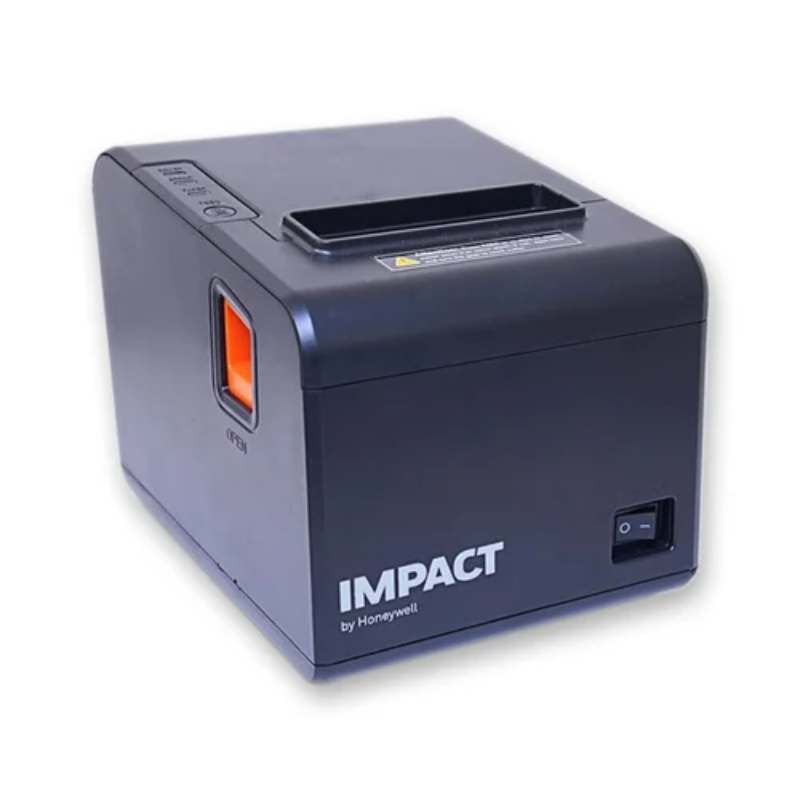
Honeywell Impact IHR810 Direct Thermal POS Receipt Printer
KSh 17,999.00
Honeywell Impact IHR810 Direct Thermal POS Receipt Printer – USB, Serial & Ethernet
Speed up checkout operations with the Honeywell Impact IHR810 Direct Thermal POS Receipt Printer, model IHR810X-B-214IN. Designed for retail, restaurants, supermarkets, hospitality, and other point-of-sale environments, this compact receipt printer delivers printing speeds of up to 260 mm/s and supports 80 mm receipt paper. Honeywell specifies USB, Serial, and Ethernet connectivity, making the Honeywell Impact IHR810 Receipt Printer a flexible solution for modern POS systems.
Key Features & Benefits
- Fast 260 mm/s printing – Process receipts quickly and help reduce queues during busy checkout periods.
- 80 mm receipt printing – Supports standard 3-inch receipt paper for common retail and hospitality applications.
- USB, Serial & Ethernet connectivity – Connect the printer to compatible POS computers and network environments.
- Compact design – Save valuable counter space in retail and service environments.
- Direct thermal printing – Print receipts without traditional ink cartridges or ribbons.
- Auto-cutter – Support faster receipt handling in busy checkout environments.
- High-volume capability – Honeywell positions the IHR810 for demanding receipt-printing environments.
- New condition – Receive a new printer configuration suitable for professional POS deployment.
- 1-year warranty – Get added purchasing confidence with the supplied warranty.
Technical Specifications
| Specification | Details |
|---|---|
| Brand | Honeywell Impact |
| Model | IHR810 |
| SKU / Part Number | IHR810X-B-214IN |
| Printer Type | Direct Thermal POS Receipt Printer |
| Printing Method | Direct Thermal |
| Print Speed | Up to 260 mm/sec |
| Paper Width | 80 mm / 3-inch |
| Connectivity | USB + Serial + Ethernet |
| Ethernet | Network connectivity |
| Auto Cutter | Yes |
| Condition | New |
| Warranty | 1 Year |
| Primary Use | Point of Sale / Receipt Printing |
Pros & Benefits
✓ Faster checkout: Print receipts quickly and keep customer queues moving.
✓ Flexible connectivity: Choose USB, Serial, or Ethernet depending on your POS setup.
✓ Lower consumable complexity: Direct thermal printing eliminates the need for conventional ink cartridges.
✓ Space-efficient: Fit the printer comfortably on a retail or hospitality counter.
✓ Business-ready: Designed for demanding receipt-printing environments.
✓ Easy paper handling: Drop-in receipt paper loading simplifies routine operation.
✓ Professional POS solution: Integrate receipt printing into compatible retail and hospitality systems.
Variation & Price
| Model | Printing Method | Speed | Paper Width | Connectivity | Condition | Warranty | Price |
|---|---|---|---|---|---|---|---|
| Honeywell IHR810X-B-214IN | Direct Thermal | Up to 260 mm/s | 80 mm | USB + Serial + Ethernet | New | 1 Year | Contact Potent.it for Current Price |
Prices and availability may change. Confirm the current price, stock, and final configuration before ordering.
Suitable Application Areas
The Honeywell Impact IHR810 Receipt Printer suits a wide range of commercial environments:
- Retail shops and supermarkets
- Restaurants and cafés
- Hotels and hospitality businesses
- POS counters
- Pharmacies
- Fuel stations
- Convenience stores
- Ticketing counters
- Self-service environments
- Small and medium-sized businesses
- Warehouse and dispatch counters
- Service businesses
Shop Honeywell POS Printers in Kenya
Looking for more POS printing solutions? Explore the available Honeywell thermal receipt printers and POS printers at Potent.it Kenya.
Shop More Honeywell Thermal Receipt Printer Deals at Potent.it Kenya
Shop the Honeywell Impact IHR810 Direct Thermal POS Receipt Printer today and equip your business with fast, flexible receipt printing for efficient everyday transactions.
Full Setup Guide – Honeywell Impact IHR810
Honeywell’s official documentation provides installation, driver, paper-loading, Ethernet configuration, and utility instructions for the IHR810.
1. Unpack the Printer
Check the printer and supplied accessories before installation. The IHR810 documentation lists the printer, AC adapter, power cord, USB cable, 80 mm paper roll, serial cable, user guide, and quick-start guide among the package contents.
2. Connect the Power
Connect the AC adapter to the printer’s power interface and connect the power cord to an appropriate power source.
3. Connect the POS System
Choose the connection that matches your POS configuration:
- USB: Connect the printer directly to the computer or POS terminal.
- Serial: Connect the serial cable and configure the appropriate COM port settings.
- Ethernet: Connect the printer to your network using Ethernet.
The IHR810 supports USB, Serial, and Ethernet interfaces in the specified configuration.
4. Install the Receipt Paper
Open the paper-cover compartment, insert the compatible 80 mm receipt roll, pull a small amount of paper through the outlet, and close the cover. The user guide documents drop-in paper installation.
5. Install the Printer Driver
Connect the printer to the computer, power it on, and install the appropriate IMPACT IHR810 printer driver. Honeywell’s manual provides Windows driver installation instructions and identifies the printer within the operating system’s printer settings.
6. Configure Ethernet
For network deployment, print a self-test by powering on the printer while holding the FEED button. The self-test provides network information, including the printer IP address. Honeywell documents the factory-default IP as 192.168.123.100 in its manual.
Use the IHR810 utility to select NET, choose the IHR810 printer type, identify the current printer IP, and assign a suitable new IP address when required. The computer and printer should use compatible network segments for communication.
7. Test Printing
After installing the driver and configuring the connection, print a test receipt or test page. Check paper feeding, print quality, cutter operation, and POS software communication before putting the printer into daily service.
8. Connect to Your POS Software
Configure the POS application to use the installed IHR810 printer. Select the correct printer port and confirm the paper size and receipt format. For Ethernet installations, use the configured network printer/IP settings.
Official setup and documentation:
Honeywell IHR810 Product Page, Manuals & Guides
Official Honeywell IHR810 User Manual (PDF):
Honeywell IHR810 User Manual
FAQs
What is the Honeywell Impact IHR810?
The Honeywell Impact IHR810 is a direct thermal POS receipt printer designed for retail, hospitality, restaurants, and other checkout environments.
How fast does the IHR810 print?
The IHR810 provides printing speeds of up to 260 mm/s.
What paper does the Honeywell IHR810 use?
The specified model supports 80 mm / 3-inch receipt paper.
Does the IHR810 support Ethernet?
Yes. The specified configuration includes Ethernet connectivity, alongside USB and Serial interfaces.
Does the IHR810 need ink?
No. It uses direct thermal printing, so it does not require conventional ink cartridges or ribbons.
Is the Honeywell IHR810 suitable for POS systems?
Yes. Honeywell designed the IHR810 as a thermal receipt printer for POS environments and high-volume applications.
Is the Honeywell IHR810 new?
Yes. The supplied product condition is New.
What warranty does it have?
The supplied product specification includes a 1-year warranty.
What Is in the Box?
Based on the IHR810 user documentation, the package includes:
- Honeywell Impact IHR810 thermal receipt printer
- AC adapter
- Power cord
- USB cable
- 80 mm receipt paper roll
- Serial cable
- User guide
- Quick-start guide
Exact package contents can vary by configuration or market, so confirm the final box contents with Potent.it before purchase.
Creative Verdict
The Honeywell Impact IHR810 Direct Thermal POS Receipt Printer combines fast 260 mm/s receipt printing, 80 mm paper support, USB, Serial and Ethernet connectivity, compact design, and direct thermal technology in a practical POS solution. It suits businesses that need dependable receipt printing at retail counters, restaurants, hospitality locations, and other transaction points.
Ready to improve your checkout workflow? Shop the Honeywell IHR810 at Potent.it Kenya and equip your POS system with fast, flexible receipt printing.
Based on 0 reviews
Be the first to review “Honeywell Impact IHR810 Direct Thermal POS Receipt Printer”
Related products
-
POS Systems
X-POS EC-970-NT (9.7″ / Non-Touch)
Key Technical Specifications
Feature Technical Specification Model & Type X-POS EC-970-NT 9.7” Secondary Customer Display Screen (Non-Touch) Display Panel 9.7-inch TFT LCD with LED Backlight Native Resolution 1024 x 768 pixels (Standard) / Up to 1280 x 800 Aspect Ratio 4:3 (Traditional) / 16:10 compatible Processor Compatibility Natively compatible with Intel Core i3, J6412, and J1900 POS systems Interface Ports VGA / HDMI for video, USB for power/signal Mounting Options VESA mount / Terminal-attached bracket support Warranty Coverage 1-Year Limited Hardware Warranty SKU: n/a -
POS Systems
X-POS EC-T4-910-i33 (15″ / Core i3 8th Gen / 16GB RAM / 256GB SSD / Win 11)
Key Technical Specifications
Feature Technical Specification Model & Type X-POS EC-T4-910-i33 All-in-One Touch POS Terminal Processor Intel® Core™ i3 8th Generation Processor Memory (RAM) 16GB DDR4 RAM Storage 256GB Solid State Drive (SSD) Operating System Windows 11 Pro / IoT Enterprise Display Panel 15-inch Bezel-Free True Flat PCAP Multi-Touchscreen I/O & Connectivity 6 x USB Ports (2 Rear, 4 Back), 4 x Serial COM Ports (COM 2 & 3 RJ45 full signal) Display Outputs 1 x VGA Output, 1 x HDMI Output Networking 1 x Gigabit Ethernet (RJ45) port Warranty Coverage 1-Year Limited Hardware Warranty SKU: n/a -
Printers, POS Systems, Thermal Receipt Printers
XPrinter XP-E200L Thermal Receipt Printer – Direct Thermal POS Printer
 Printers, POS Systems, Thermal Receipt Printers
XPrinter XP-E200L Thermal Receipt Printer – Direct Thermal POS Printer
Specification
- Model XPrinter XP-E200L
- Printing Method Direct Thermal (No Ink or Toner Needed)
- Print Speed Up to 200 mm/s High-Speed Printing
- Paper Width 79.5 ± 0.5 mm (Standard 80mm Layout)
- Print Width 72 mm Maximum Printable Area
- Physical Interfaces USB Port + Serial Port (RS232) + Ethernet (LAN) Port
- Barcode Support 1D (UPC-A, EAN13, Code39, Code128) & 2D (QR Code, PDF417)
- Auto Cutter Integrated Mechanical Cutter (Partial Cut, 1.5 Million Cuts Rating)
- Cash Drawer Output RJ11 Port Interface (DC 24V / 1A)
- Emulation Command ESC / POS Compatible
- System Drivers Windows, Linux, macOS, Android, JPOS, OPOS
- Warranty 1-Year Limited Manufacturer Warranty
SKU: n/a -
POS Systems, Label Printers
X-POS GS-2408D 4-inch Direct Thermal Label Printer
Key Technical Specifications
Feature Technical Specification Model & Type X-POS GS-2408D 4-inch Direct Thermal Label Printer Printing Method Direct Thermal Printing Technology Printing Width Up to 4.25-inch (108 mm max print width) Resolution 203 dpi (Dot density for sharp text and barcodes) Media Type Thermal labels, gap, continuous, fan-fold, and black mark paper Interface Connectivity USB / Serial / Network options System Compatibility Windows and major label design software support Warranty Coverage 1-Year Limited Hardware Warranty SKU: n/a


There are no reviews yet.